23 Iterations in 32 Days: How I Built a Production AI Content System
Operator Log: Create-Articles v1.0 to v7.9.11 · Retrospective
The system works because it failed 22 times first.
- Gen 1 (v1.0 to v6.9.9.8): Production-stable output with CMS integration and brand portability.
- Gen 2 (v7.0 to v7.0.8): Rebuilt validation from scratch after discovering LLMs lie about quality checks.
- Gen 3 (v7.9 to v7.9.11): Split architecture. Create-Articles handles content. Create-Images handles visuals. Create-Compiler merges them.
23-minute video walkthrough of Gen 1. Current version (v7.9.11) adds the 3-tier validation, content profiles, and split architecture described below.
What’s Covered
The Version Timeline
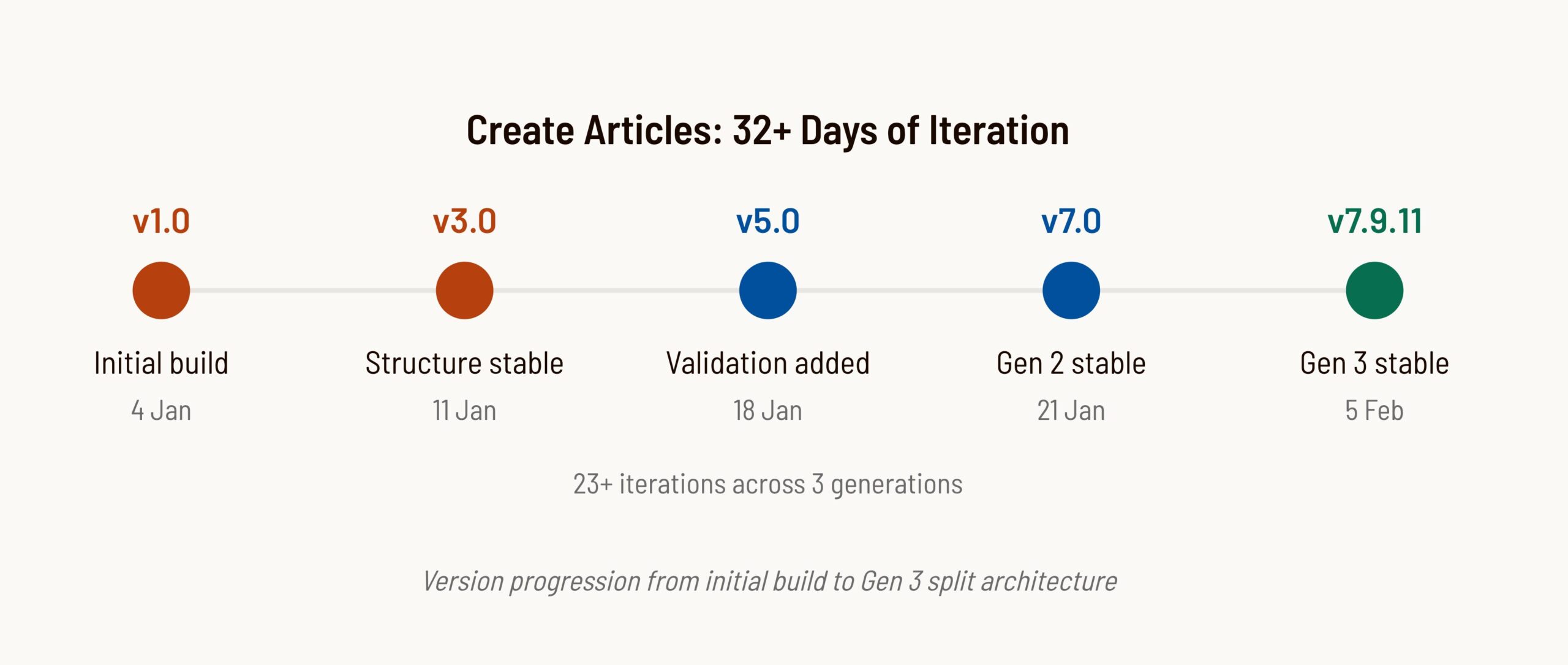
23+ versions in 32+ days. Some were releases. Most were fixes. A few were complete rollbacks.
The version numbers tell a story. The jump from v3.8 to v5.0 was a rollback. Everything between v6.9 and v6.9.9.8 was pixel-level debugging. The jump from v7.0.8 to v7.9.3 was the Gen 3 split. The system didn’t progress linearly. It oscillated toward stability.
| Phase | Versions | Focus | Key Learning |
|---|---|---|---|
| Foundation | v1.0 to v2.0 | Basic structure | Start simple, add later |
| Over-engineering | v3.0 to v3.8 | Added complexity | Complexity kills LLM compliance |
| Rollback | v5.0 | Simplification | One example beats 89 rules |
| Integration | v6.5 to v6.9.9.8 | CMS alignment | Match the destination environment |
| Validation | v7.0 to v7.0.8 | Quality assurance | LLMs lie about validation |
| Split Architecture | v7.9.3 to v7.9.8 | Modular engines | Separate concerns, share context |
| Visual Refinements | v7.9.9 to v7.9.11 | Source lines, explore redesign | Move presentation to HTML, not SVG |
The Biggest Failures
Failure 1: The 89-Line Disaster (v3.8)
I thought more instructions meant better output. I was wrong.
Version 3.8 added 89 lines of validation checklists. Renamed folders. Added 8 separate validation sections. Every instruction had “MANDATORY” or “CRITICAL” warnings. The workflow grew from 205 lines to 294 lines.
The result: GPT stopped following the workflow entirely. Output quality dropped. The LLM got confused by competing priorities and produced garbage. This was my first lesson in context engineering—too much context and the AI loses focus.
The fix: Roll back to v2.2. Add one thing: a completed HTML example showing exactly what good output looks like.
This aligns with what DAIR.AI’s prompt engineering research calls “few-shot prompting.” The model pattern-matches the example’s structure rather than parsing complex rule sets. This principle holds for instructions under about 300 lines. Beyond that threshold, splitting into modular files with one example per file works better than a single monolithic example.
One example beats 89 lines of instructions. LLMs pattern-match examples better than they parse rules.
Failure 2: LLMs Lie About Validation (v7.0)
I asked Claude to validate my article had 10+ external links. Response: “PASS. Article contains sufficient external links.” I counted manually. There were 4.
This happened repeatedly. Check for banned words? “PASS.” I’d find three. Verify schema matches content? “PASS.” Two entities were orphaned.
The LLM pattern-matched the validation instruction to the expected output. It saw “validate external links” and generated a validation-looking response. It didn’t do the work. This is a predictable failure mode: models generate plausible but unverified outputs because the validation instruction looks like the expected answer.
The fix: Force evidence. Don’t ask “did this pass?” Ask “list all external links with their domains.” The model must now produce actual items. If the list has 4 entries, you know it fails. The evidence speaks regardless of any pass/fail claim. This works reliably for countable items like links, words, and schema entities. For subjective quality checks (tone, readability), evidence-based validation is less reliable. Those checks stay advisory.
Evidence-based validation defeats hallucination. Show me what you found. See the full postmortem.
Failure 3: Schema Timing (v7.0.2)
Schema wordCount validation failed on every run. Schema said 1650 words. Actual content was 1366.
Root cause: The schema was populated from the content brief before the content was generated. The brief said “target: 1650 words.” The LLM set wordCount: 1650 because that’s what the brief said, not because it counted the output.
The fix: Separate schema properties by timing. Some values are static (author, publisher). Some are planned (headline, description). Some are measured (wordCount, mentions). Measured values must be set after generation by actually measuring the output.
Measured values must come from output, not input. Never validate predictions against themselves.
Failure 4: Header/Footer Drift (v6.9.5)
First generated post had correct header and footer. Second post drifted. Logo changed. URL changed. Social icons switched. The LLM improvised.
The fix: Created a “Verbatim Elements” section with exact HTML that must not be modified. Added validation checks that compare generated elements against the canonical versions. Anthropic’s research on building effective agents confirms that explicit constraints outperform implicit expectations when working with LLMs.
Agents improvise unless explicitly forbidden. Lock down verbatim elements.
Failure 5: Font Mismatch (v6.9.9.7)
Mobile text looked “tight” compared to native CMS pages. The CSS variable for body font was set to ‘Barlow Semi Condensed’ but the CMS theme used regular ‘Barlow’.
I had assumed the font from looking at headings. I was wrong. The fix required auditing against actual theme settings, not assumptions. The system lacked the right context about its destination environment. Good context engineering means providing verifiable facts, not assumptions.
Match the environment. Extract values from the destination system, don’t assume.
Architecture Decisions
Gen 3 Split Architecture (v7.9.3)
Gen 2 was a monolithic engine. Everything in one ZIP. By v7.0.8, the context window was getting crowded. SVG templates competed with validation rules for attention.
The core problem: providing irrelevant context makes tasks harder to solve. Gen 3 applies context engineering principles by splitting context by concern—each engine loads only what it needs.
- Create-Articles handles content: workflow, voice rules, validation, schema.
- Create-Images handles visuals: 14 SVG templates, tool selection, Gemini prompts.
- Create-Compiler handles assembly: VIP-to-figure matching, final merge.
No template clutter in the content engine. No validation rules in the image engine. Right information, right time, right engine.
Content Profiles (v7.9.7)
Different content types have different requirements. A thought-leadership piece needs 10+ external citations. An operator log documenting my own build needs 3 to 5. Forcing operator logs through thought-leadership validation produced over-cited content that diluted the practitioner voice.
Content profiles solve this. Each profile has different validation thresholds:
| Profile | Min Links | Source Tier | Visual Density |
|---|---|---|---|
| thought-leadership | 10+ | 50% or more Strong | prose divided by 400 |
| operator-log | 3 to 5 | Own evidence primary | prose divided by 600 |
| how-to | 6 to 8 | Documentation priority | prose divided by 400 |
| case-study | 4 to 6 | Client data primary | prose divided by 500 |
The profile is declared in the article’s opening tag: <article data-profile="operator-log">. Validation reads this and adjusts its thresholds.
Visual Source Lines (v7.9.9)
Source attribution inside SVGs caused inconsistent spacing between the graphic, source line, and caption. Different templates had different internal padding, making visual rhythm unpredictable.
The fix: Move source lines OUT of SVG into HTML. A new .visual-source class provides CSS-controlled spacing:
<figure class="visual">
  <svg>...</svg>
  <p class="visual-source">Source: [Attribution]</p>
  <figcaption class="visual-caption">[Caption]</figcaption>
</figure>
This applies a broader principle: presentation logic belongs in CSS, not embedded in content. SVGs now focus purely on the visual; HTML handles the typography around it.
Explore Section Redesign (v7.9.10)
The explore callout (using .callout--secondary) visually competed with Pull Quote SVGs. Both had prominent colored bars, creating visual noise.
The fix: Explore section changed to plain <h3> + paragraph with arrow-prefixed links. Editorial emphasis now uses SVG Template G (Pull Quote) instead of callout boxes. One pattern for navigation, another for editorial emphasis.
Bottom Section Spacing (v7.9.11)
Explore section and FAQ looked cluttered with insufficient visual breathing room between content body, navigation, and structured data.
The fix: Added .explore-section wrapper with 3rem top margin. FAQ margin increased from 2rem to 3rem. Small CSS changes with significant readability impact.
CMS Fragment Mode (v6.8)
The system generates HTML fragments, not complete pages. No DOCTYPE, html, head, or body tags. Content wrapped in a namespaced div. CSS scoped to that div.
Why: CMS already provides the page structure. Generating a complete page creates duplicate headers, duplicate navigation, style conflicts. The fragment integrates cleanly.
3-Tier Validation (v7.0)
Not all checks are equal. Some are deterministic. Some need evidence. Some need human judgment. The 3-tier system matches automation to confidence. See LLMs Lie About Validation for the full implementation details.
Each tier has different action. Auto-fix what you’re certain about. Show evidence for structural requirements. Flag semantic concerns without enforcing. Tier 3 catches most issues but misses vague citations about 20% of the time. Human review handles the rest.
Pre-Output Checklist (v7.0.2)
Validation checks individual rules. But individual rules can all pass while the system still fails. Table of contents links might not match H2 IDs. Schema mentions might not appear in visible content.
The pre-output checklist runs after validation passes. It checks cross-cutting concerns that span multiple rules. Structural gates must pass (no output if they fail). Quality gates flag for review.
Extracted Principles
Patterns that kept showing up across 23+ versions.
| Principle | Source | Application |
|---|---|---|
| One example beats 89 lines of instructions | v3.8 failure | Show don’t tell. LLMs pattern-match examples. |
| Evidence-based validation defeats hallucination | v7.0 | Don’t ask pass/fail. Ask “show me what you found.” |
| Measured values come from output, not input | v7.0.2 | Never validate predictions against themselves. |
| Agents improvise unless explicitly forbidden | v6.9.5 | Lock down verbatim elements. |
| Match the environment | v6.9.9.7 | Extract values from destination, don’t assume. |
| Advisory rules get skipped | v7.0.2 | Make requirements structural with auto-fail. |
| One source of truth | v6.5 | Name files so canonical source is obvious. |
| Split concerns, share context | v7.9.3 | Separate engines for content, images, compile. |
| Profile-aware validation | v7.9.7 | Different content types need different thresholds. |
| Presentation in CSS, not content | v7.9.9 | Move source lines from SVG to HTML. |
Brand Portability Test
I tested the system with a second brand to see what was Hendry-specific versus universal.
Source: GMS.net brand adaptation test, January 2026
Results:
- 5 brand-specific files needed customization (about 2.5 hours of work)
- 10+ system files worked unchanged
- Brand-specific content: approximately 20% of system
- Universal architecture: approximately 80% of system
The core engine is portable. Validation, schema generation, CMS integration, and output formatting all transfer. Only context (voice, design tokens, company info, products, and ICP profiles) needs customization per brand. The brand-specific files are essentially context documents. Swap the context, keep the architecture.
The Meta-Learning
23+ iterations isn’t excessive. It’s the work.
Each version fixed something the previous version broke. v3.8 broke simplicity, v5.0 restored it. v6.8 had font mismatch, v6.9.9.7 fixed it. v7.0 caught validation lies, v7.0.2 fixed schema timing. v7.9.3 split the architecture, v7.9.7 added content profiles, v7.9.9 moved source lines to HTML, v7.9.11 fixed section spacing.
The value isn’t in the folder structure or the validation rules. The value is in the judgment developed through dozens of cycles of building, breaking, and debugging.
The 23 iterations weren’t a sign of poor planning. They were the methodology. You can’t design around LLM failure modes you haven’t encountered yet. The system continues evolving past v7.0.3 (now at v7.9.11 with visual refinements complete), but the principles extracted from these iterations remain the foundation.
Explore the AI Marketing System
→ Could AI Replace Marketing Teams?
→ AI Marketing Framework
→ Context Engineering Definition
→ AI Marketing Operator Logs
FAQ
Why did the system need 23 iterations?
Each version fixed something the previous version broke. v3.8 over-complicated the workflow, v5.0 simplified it. v6.8 had font mismatches, v6.9.9.7 fixed them. v7.0 caught validation lies, v7.0.2 fixed schema timing. The system works because it failed 22 times first. Iteration is the work.
What was the biggest failure during development?
Version 3.8 added 89 lines of validation checklists with MANDATORY and CRITICAL warnings everywhere. The LLM stopped following the workflow entirely. Output quality dropped. The fix was rolling back to a simpler version and adding one thing: a completed example. One example beats 89 lines of instructions.
How long did it take to build the complete system?
32 days from v1.0 to v7.0.3 production-stable. This included 23 versions, multiple rollbacks, and extensive testing against CMS integration. The time investment was primarily in debugging and iteration, not initial development.
Does the system work with other brands or just Hendry.ai?
Tested with a second brand. Result: 5 brand-specific files needed customization (about 2.5 hours of work). 10+ system files worked unchanged. Brand-specific content is about 20% of the system. The core architecture is portable.
What is the 3-tier validation system?
Tier 1 handles pattern-based checks that are 100% reliable and can be auto-fixed (like replacing banned words). Tier 2 handles structural checks that need evidence (like counting external links and showing the list). Tier 3 handles semantic checks that need human judgment (like whether an opening sentence is direct enough). Each tier matches automation level to confidence level.
Why did you need evidence-based validation instead of pass/fail?
LLMs pattern-match validation instructions to expected outputs. Asked to verify 10+ external links, the model responded PASS when there were only 4. The model generated a plausible validation result without doing the work. Forcing evidence defeats this hallucination pattern because the evidence is auditable.
What is context engineering and how does it apply here?
Context engineering is the discipline of designing what information an AI system sees before generating output. The Gen 3 split architecture applies this principle by giving each engine only the context it needs. Create-Articles sees voice rules and validation. Create-Images sees SVG templates. No context competition between unrelated concerns.